Review hourly pay.
Understand the difference.
Compare supplied actual payments with represented deterministic calculations under the three supported Awards.
AUSTRALIAN PAYROLL AUDIT SOFTWARE
Explore supported hourly-pay comparisons under Hospitality, Retail and Restaurant Awards, with evidence and human review. Controlled demonstration; production use is disabled.
01 FROM DIFFERENCE TO UNDERSTANDING
For payroll teams, bookkeepers, accountants and employers who need a clear path from a pay difference to the evidence behind it.
Compare supplied actual payments with represented deterministic calculations under the three supported Awards.
Inspect the stored calculation, relevant inputs and Award clause references where available.
Missing, conflicting or unsupported evidence is rejected or retained for manual review rather than silently guessed.
Add notes, save Accept or Reject decisions, finalise completed reviews and inspect saved results.
The controlled demonstration reviews supplied records. It does not create pay runs, write back or automatically correct payments.
WATCH THE DEMO · 2 MIN 33 SEC
The player connects to YouTube only when you select Play. Watch on YouTube.
Watch a controlled WageReview demonstration using synthetic data. Follow an Award calculation, a result within tolerance and a record requiring manual review. Human review is required. Not legal advice.
Narration uses a synthetic (AI) voice.
Questions: support@wagereview.com.au
A payroll difference is only useful when you can see what caused it. WageReview compares recorded hourly pay with Award calculations, and shows you the evidence.
You upload one package: employee profiles, pay and time records, and rosters. It covers the Retail, Hospitality and Restaurant Awards, for pay periods from July 2023. Each record is checked against the Award rules and rates that applied at the time.
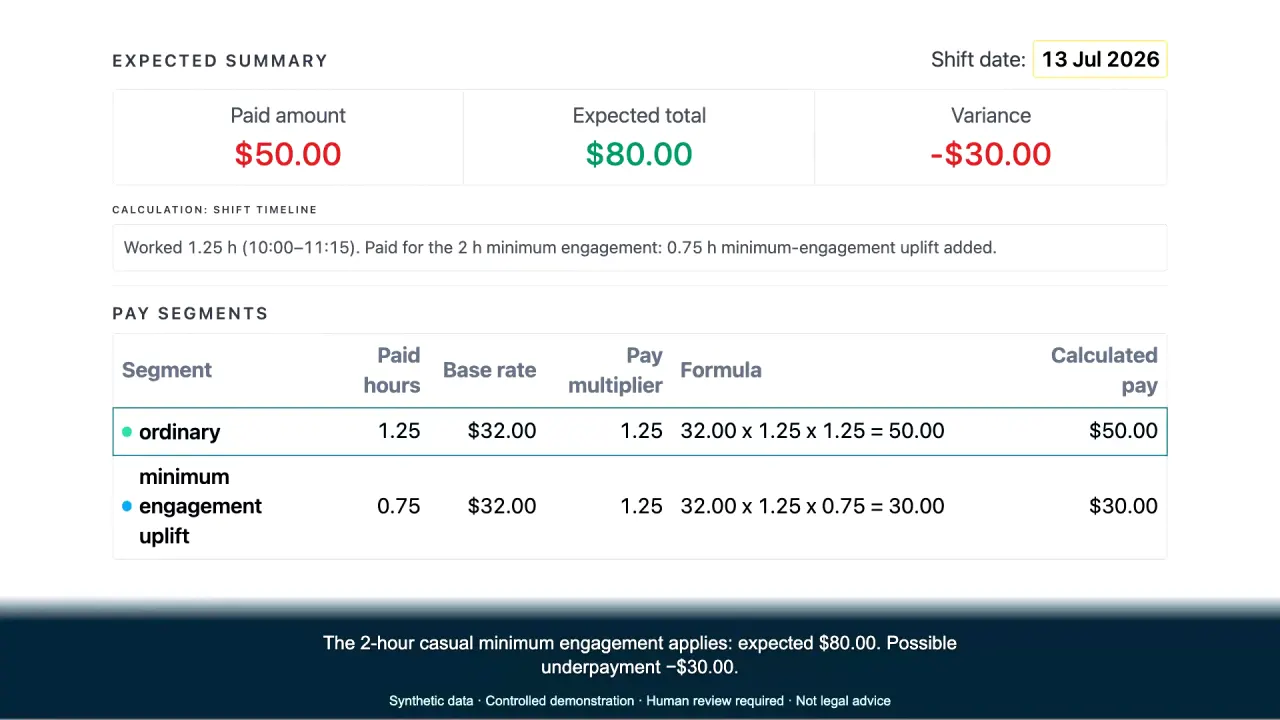
Here's a casual hospitality worker who worked a short shift: one and a quarter hours, paid fifty dollars. The two-hour minimum engagement applies, so the expected pay is eighty dollars, a possible underpayment of thirty dollars. Each line shows its formula. And every rate and multiplier points to its Award clause.
Now a casual retail employee on a Sunday. Four hours at the Sunday rate, two hundred and twenty-four dollars, paid correctly. The result is within tolerance; the casual loading isn't counted twice.
This restaurant employee worked a public holiday, but there's no evidence of how they chose to be paid for it. So the system doesn't guess. It flags the record for manual review and explains why.
A reviewer adds a note, asks payroll for the missing evidence, and records the decision. WageReview is read-only. Your payroll system isn't changed.
See it with your own scenarios. Request a twenty-minute synthetic-data demo at wagereview.com.au. No employee files needed.
02 A FOCUSED SCOPE
Three supported Awards. Specific calculations. Clear limits. Explore the scenarios and evidence relevant to your team.

From weekend trading to hours across a roster cycle, connect pay questions with the records needed to review them.
Explore Retail review →MA000009
Bring ordinary pay, penalties and supported period calculations into a review your payroll team can follow.
Explore Hospitality review →MA000119
Review daily and period overtime, part-time hours and supported monetary rest outcomes with the right evidence.
Explore Restaurant review →04 BEFORE WE TALK
Calculations are deterministic and use effective-dated rules within the documented scope. That does not make them error-free or legally complete. Review the inputs, stored calculation and Award references; coverage, classification and ambiguous interpretation need professional assessment.
WageReview supports a human reviewer. It does not provide legal advice, an indemnity, a complete compliance assurance or protection from prosecution. Agree responsibilities and evaluation terms separately before relying on outcomes.
No employee files are needed for a synthetic demo. Do not send payroll or employee records through this website or its contact form. Hosting, access, retention and other data-handling arrangements must be agreed before any later evaluation uses employer records; no production security certification is claimed.
That can be useful, and your existing tools may already meet your needs. A separate record-to-calculation review can help investigate a defined historical pay question. WageReview does not replace your payroll system or claim to be the only review tool.
No. Production use is disabled. The current offer is a controlled demonstration and evaluation-suitability conversation. It is not permission to run live payroll or rely on results to make repayments.
No. It compares represented hourly outcomes under Retail MA000004, Hospitality MA000009 and Restaurant MA000119. Salary reconciliation, allowances, higher duties, tax, superannuation, leave and termination calculations are outside scope. Other Award-specific limits and unresolved cases require separate review. A matching result means within the supported calculation scope and pay tolerance, not complete compliance.
The current UI does not provide audit-result or report exports or downloads. You can inspect saved results in Review centre and record notes and decisions. Those saved decisions are not an authenticated professional attestation.
Uploads use Package ZIP only. Map authoritative employee, pay/time and actual-work roster records to the current templates, include applicable setup and all required periods, then preview the package. A payroll export may need reformatting. Direct payroll integration and automatic recovery of missing facts are not offered.
Missing or conflicting inputs may be rejected, block an affected calculation or require manual review. The system does not invent missing payroll facts.
A CONSIDERED NEXT STEP
Explore the workflow, supported scenarios and evidence boundaries before deciding what questions need further review.
Request a demo to discuss your needs. Submitting a request does not confirm a booking.